

Claude Code vs Codex is one of the more interesting comparisons in AI-assisted development right now, because both tools look nearly identical on paper.
Both can read your codebase, write code, and run commands. On paper, they look similar.
In practice, they work very differently.
Claude Code thinks before it acts. It maps the problem, proposes a plan, and waits for your approval before touching anything. Codex gets to work immediately, executing across files, running tests, and iterating autonomously until the task is done.
This article breaks down exactly where Claude Code and Codex diverge, using real workflows on a real project so you can see how each tool behaves when the task gets complex.
Claude Code vs Codex - Key Takeaways
Claude Code and Codex are both powerful AI tools for developers, but they operate at very different levels of the workflow. Claude Code emphasises planning and reasoning. It helps you understand systems, think through architectural decisions, and make controlled changes. Its structured, interactive workflow is especially useful for complex features, careful refactoring, or navigating unfamiliar codebases. Codex is built for execution at scale. It excels at taking well-defined tasks and running with them, scanning entire codebases, applying changes across multiple files, and running tests. With support for parallel subagents, it can distribute work, making it effective for large refactors and repetitive engineering tasks. These tools are not direct replacements. Claude Code is strongest for problem-solving and defining structure, while Codex shines when you need to automate workflows or handle work at scale. For many developers, the most effective approach is combining both: using Claude Code to plan and reason through the problem, and Codex to execute and scale the implementation.| Aspect | Claude Code | Codex |
|---|---|---|
| Core approach | Thinking before doing | Doing at scale |
| Workflow style | Plan → approve → execute | Delegate → run → monitor |
| Execution model | Controlled and interactive | Autonomous and iteractive |
| Best for | Architecture and reasoning-heavy tasks | Large-scale execution and automation |
Note
Running Claude Code on a remote server? SSD Nodes gives you a Linux VPS starting at $5.50/month with a lifetime price lock and a 14 day money back guarantee. No surprise bills, no rate hikes. See plans →
Codex
Codex is an agentic coding system designed to execute software tasks end-to-end. It’s not just a model. It’s a full system. Each task runs inside an isolated cloud sandbox preloaded with your repository. Inside that environment, the agent can:- Read and modify files
- Run shell commands
- Execute tests
- Validate results
 Instead of producing a single response, Codex iterates. A request to fix a bug can trigger multiple steps: inspecting files, running tests, modifying code, and verifying the results.
What makes Codex different?
The biggest shift is execution at scale.- Tasks run independently in cloud environments
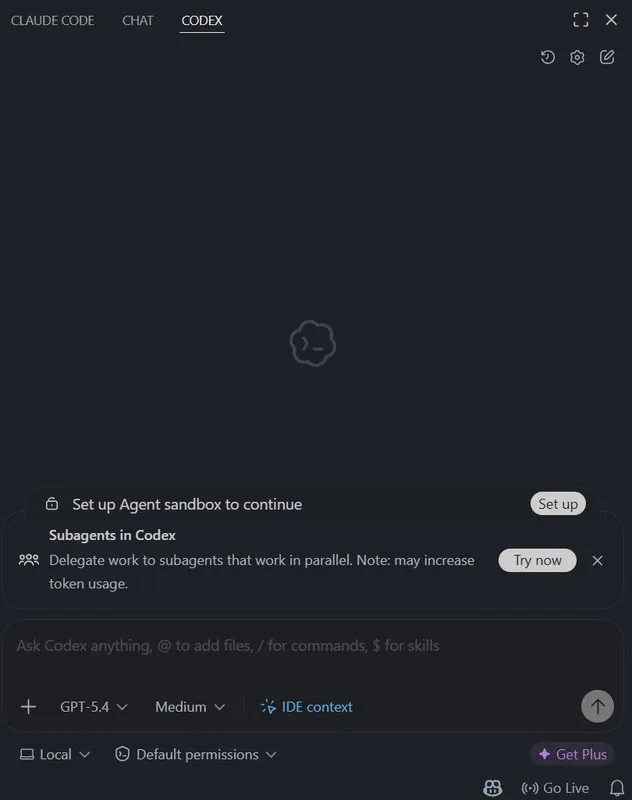
- Multiple tasks can run in parallel
- Work happens asynchronously
Trade-offs
That power comes with a few constraints:- Long-running tasks can become complex
- Context management can get expensive
- Smaller, well-scoped tasks tend to be more reliable
Claude Code
Claude Code is a reasoning-first coding agent built around a CLI and a VS Code extension. It’s designed for understanding codebases, planning changes before execution, and making structured, multi-file updates. The workflow typically looks like: Note: For a direct comparison with another popular AI code editor, see Claude Code vs Cursor.
If you're running Linux, here's how to get started: How to Install Claude Code on Ubuntu Linux
Note: For a direct comparison with another popular AI code editor, see Claude Code vs Cursor.
If you're running Linux, here's how to get started: How to Install Claude Code on Ubuntu Linux
Feature Showdown
Rather than running isolated or identical benchmarks, I tested both tools during real work on my LaundryConnect project. The goal wasn’t to force them into the same tasks, but to observe how each one behaves when used in the way it naturally prefers. I focused on practical workflows, specifically how each tool approaches planning, execution, and large-scale changes within an existing codebase.Claude Code: Designing a Feature
When working on a feature that required coordination across both backend logic and UI, my workflow naturally shifted into a planning-first approach. Task:Standardise order states across the LaundryConnect app (e.g., pending → in-progress → completed) and ensure consistency across backend logic and UI.- Status updates allowed arbitrary values with no validation
- Socket updates bypassed transition rules
- Customers were not notified when the status changed
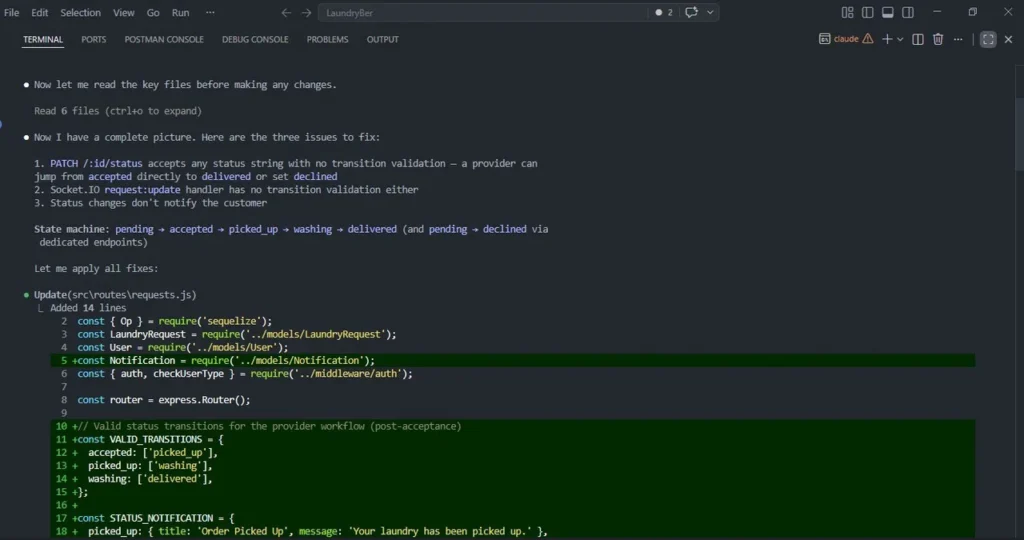
VALID_TRANSITIONS model to enforce allowed state changes, ensuring that invalid jumps (like accepted → delivered) were rejected at the API level.
It also designed a STATUS_NOTIFICATION mapping to standardise how users are notified at each stage.
Only after defining these constraints did it move into implementation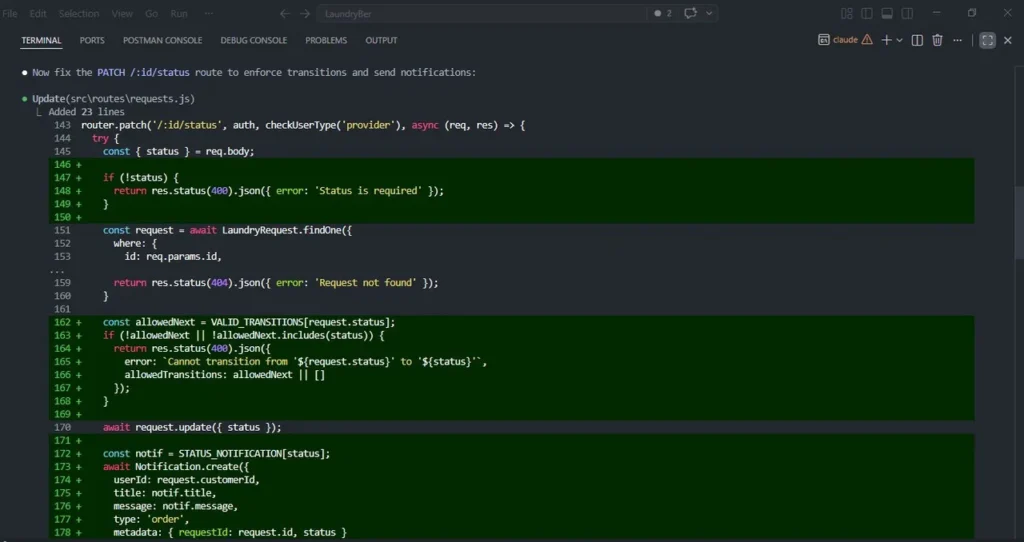 Claude then:
- Updated the
PATCH /:id/statusroute to enforce transitions - Added validation logic with clear error responses
- Integrated notification creation into status updates
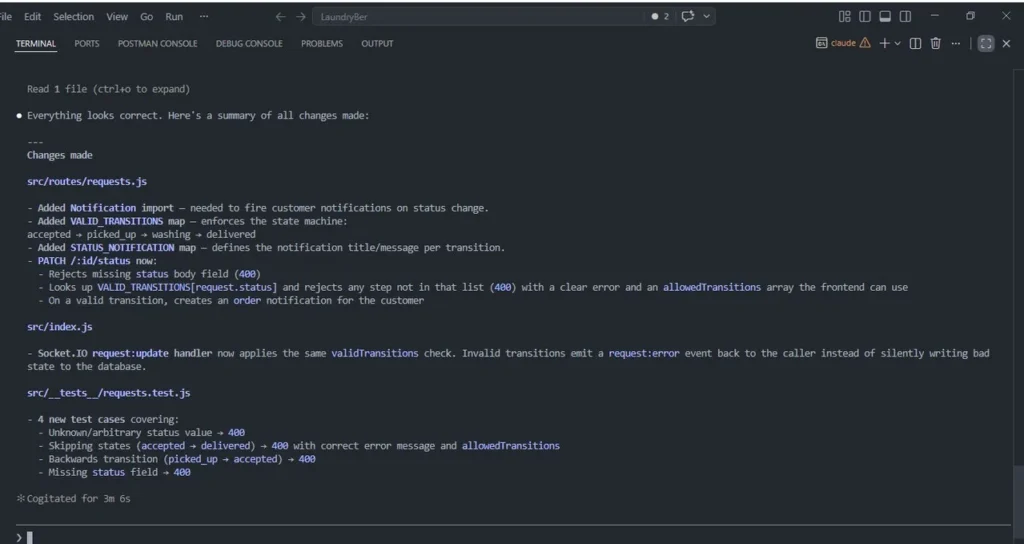
- Applied the same transition rules to socket handlers
- Added test cases covering invalid transitions, missing fields, and edge cases
Codex: Execution at Scale
To evaluate Codex’s strengths, I testedContinue reading this article
by subscribing to our newsletter.
Subscribe nowby subscribing to our newsletter.