

Most Claude Code vs Gemini CLI comparisons obsess over benchmarks. Context window sizes. Token costs. Model leaderboard rankings.
That misses the point.
Claude Code and Gemini CLI don't just differ in features. They shape how you think while coding. One slows you down on purpose. The other moves at the speed of your terminal. And which one fits the job changes everything about how you build.
I've spent serious time with both. Real codebases, real tasks, real bugs at 2 AM. This is what actually using them feels like, and why the most effective setup isn't picking one over the other.
Claude Code vs Gemini CLI: Key Takeaways
If you only have 30 seconds, here's the short version.
Claude Code feels like working with a careful senior engineer. It slows you down, but in a way that prevents mistakes. Every action is deliberate, with clear reasoning surfaced before execution. That makes it ideal for complex systems where mistakes are expensive. The trade-off is that it can feel heavy for simple tasks when you just want to move fast.
Gemini CLI feels like an extension of your terminal. It's fast, responsive, and built for momentum. There's almost no gap between intent and execution, which makes it ideal for rapid development and large-scale changes. But that speed comes with less visibility into decision-making, so you need to stay more involved to ensure correctness.
At a fundamental level, the two tools approach work differently. Claude Code operates in a think → validate → execute loop. Gemini CLI follows a prompt → generate → refine cycle. One emphasises understanding before action. The other prioritises immediate execution and continuous iteration.
These tools are not direct replacements. Trying to force one into the role of the other is where friction shows up.
| Gemini CLI | Claude Code | |
|---|---|---|
| Approach | Speed & iteration | Planning & reasoning |
| Workflow | Prompt → generate → refine | Understand → plan → execute |
| Strength | Fast execution | System-level thinking |
| Best For | Small tasks, quick fixes | Complex features, refactors |
| Trade-off | Less structure | Slower start |
The most effective workflow isn't choosing between them. It's combining both. Use Claude Code when you need to think through a problem, design a solution, or ensure correctness. Use Gemini CLI when you need to move quickly and execute with minimal friction.
What Gemini CLI Actually Does Well
Gemini CLI is a terminal-native AI coding assistant designed for speed and direct interaction.
It doesn't try to introduce a heavy orchestration layer or a structured workflow. Instead, it fits directly into how developers already work in the terminal.
You prompt it. Get output. Adjust. Keep going.
The workflow is simple:

What makes Gemini CLI stand out is its feedback loop. It's extremely fast. You can iterate multiple times in seconds, refining code, testing ideas, and moving forward without breaking momentum. It feels less like using a tool and more like extending your terminal with intelligence.
In practice, this makes it highly effective for:
- Small tasks
- Incremental feature updates
- Shell-based workflows
- Rapid prototyping
- Codebase-wide scanning and bulk refactors
It shines when the problem is already clear and you just need to execute.
That speed comes with trade-offs. Gemini CLI doesn't enforce structure. It doesn't naturally guide you toward system-level thinking. Over time, especially in larger codebases, this can lead to inconsistencies if you're not careful. It also requires more developer oversight when decisions have architectural impact.
Gemini CLI works best when tasks are well-defined, speed matters more than structure, and you want to stay in flow.
What Claude Code Actually Does Well
Claude Code is a reasoning-first coding agent built around a CLI and IDE integrations. It's designed to understand systems before making changes.
Instead of jumping straight into code generation, it starts with analysis. It looks at how different parts of the codebase connect, identifies inconsistencies, and proposes a structured approach before making changes.
The workflow typically looks like:

This separation between thinking and execution is what defines the experience. Claude Code doesn't treat tasks as isolated edits. It treats them as system design problems.
When working on a non-trivial feature, it doesn't just generate code. It identifies where logic is duplicated, where constraints are missing, and where the system could break under edge cases. Only after defining a clear structure does it move into implementation.
This makes it particularly strong for:
- Large-scale feature design
- Refactoring across multiple files
- Navigating unfamiliar codebases
- Maintaining long-term consistency
The trade-off is speed. Claude Code can feel slower, especially for simple tasks. The planning phase introduces friction when you just want to make a quick change. But that friction is often what prevents bigger problems later.
Claude Code works best when the problem isn't fully defined, the system is complex, and correctness and maintainability matter.
Running Claude Code on a VPS? A dedicated server gives you a persistent environment for long agentic sessions without choking your laptop. Spin up a VPS from $5.50/month or read our Claude Code on Ubuntu install guide.
Claude Code vs Gemini CLI Feature Showdown
Abstract comparisons only get you so far. I tested both tools on real workflows inside my LaundryConnect app, focusing on how they behave when dealing with large context, system design, and real execution inside a codebase.
The goal wasn't to force identical tasks. It was to see how each tool operates when used the way it naturally prefers.
Claude Code: Designing a Cross-System Feature
Task: Add a timestamp to every order so users can see exactly when the last status change happened.
Claude Code didn't start with the UI. It started by reading the files.
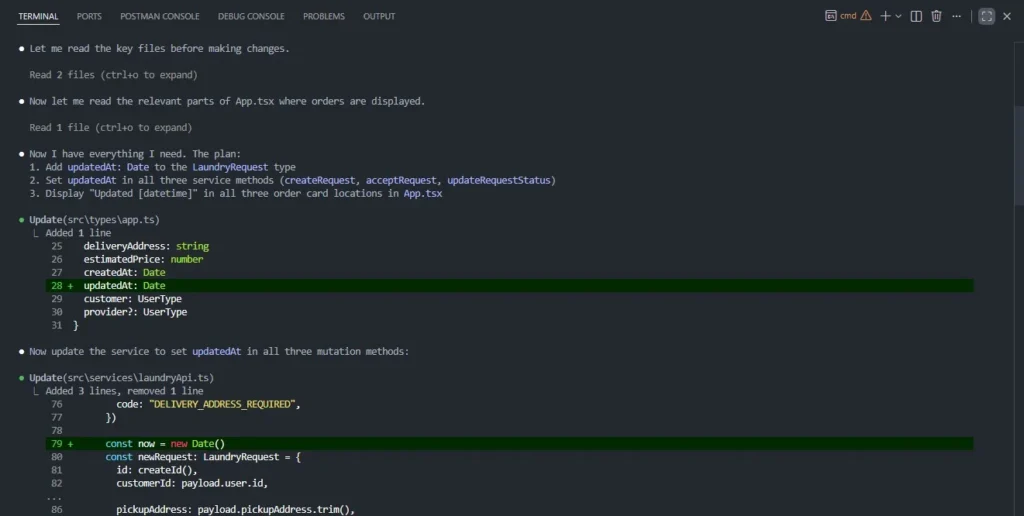
It mapped the full change surface before writing a single line:
src/types/app.ts— addupdatedAt: Dateto theLaundryRequesttypesrc/services/laundryApi.ts— setupdatedAtin all three mutation methodssrc/App.tsx— display the timestamp across all three order card locations
Then it executed all three in sequence, coordinated.
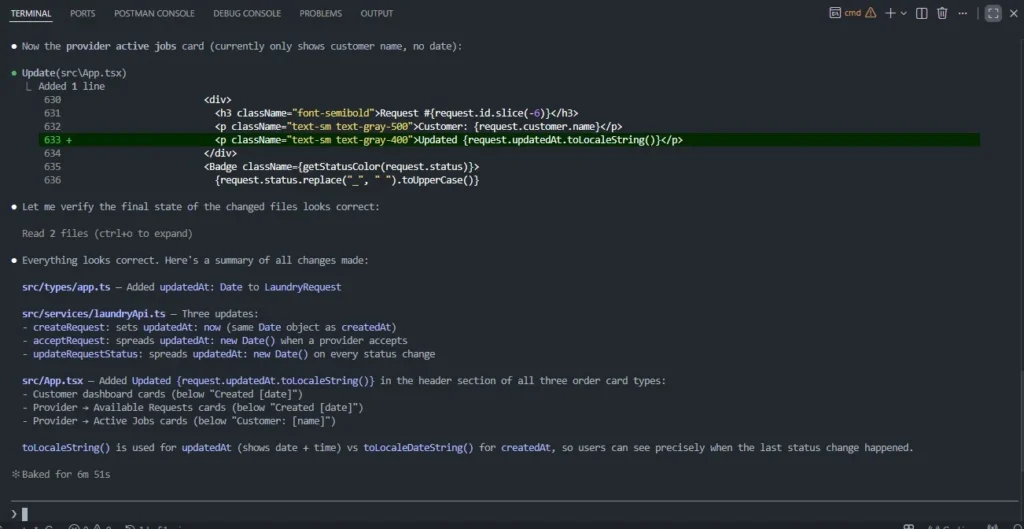
That last detail is worth noting. Claude Code chose toLocaleString() for updatedAt and toLocaleDateString() for createdAt. Different formats for different purposes, without being asked. That's the planning-first behaviour in practice. It wasn't just making changes. It was making the right changes.
Gemini CLI: Large Context in Action
To properly evaluate Gemini CLI, I leaned into one of its biggest advantages: working across a large context in a single pass.
Task: Perform a security audit across the entire codebase.
This is where Gemini CLI's large context advantage shows up directly. Rather than reading files one at a time, it processed the entire project in a single pass. Dependencies, source files, configuration, even the root directory.
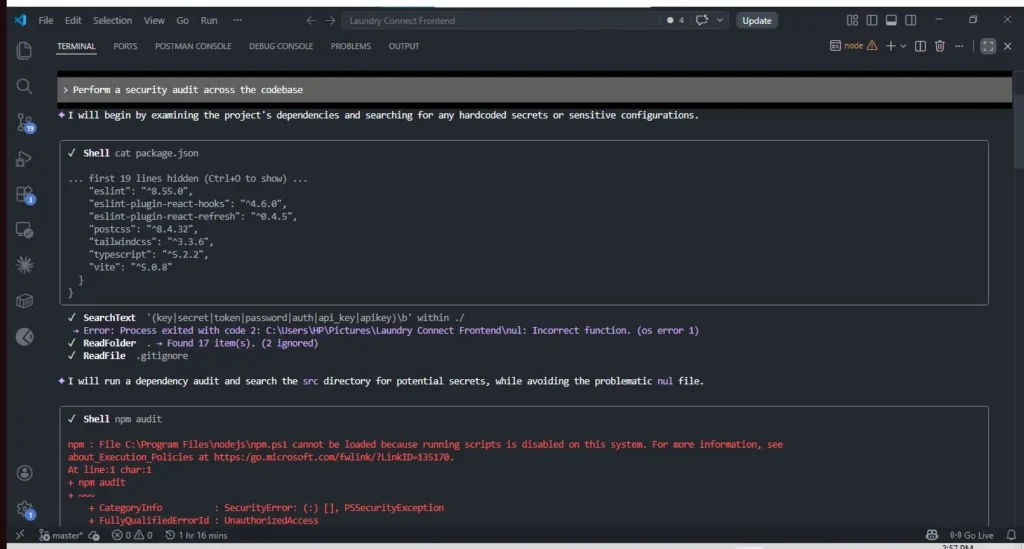
It hit a Windows execution error on npm audit due to PowerShell execution policies. And adapted. It switched to npm.cmd and continued without being told to.
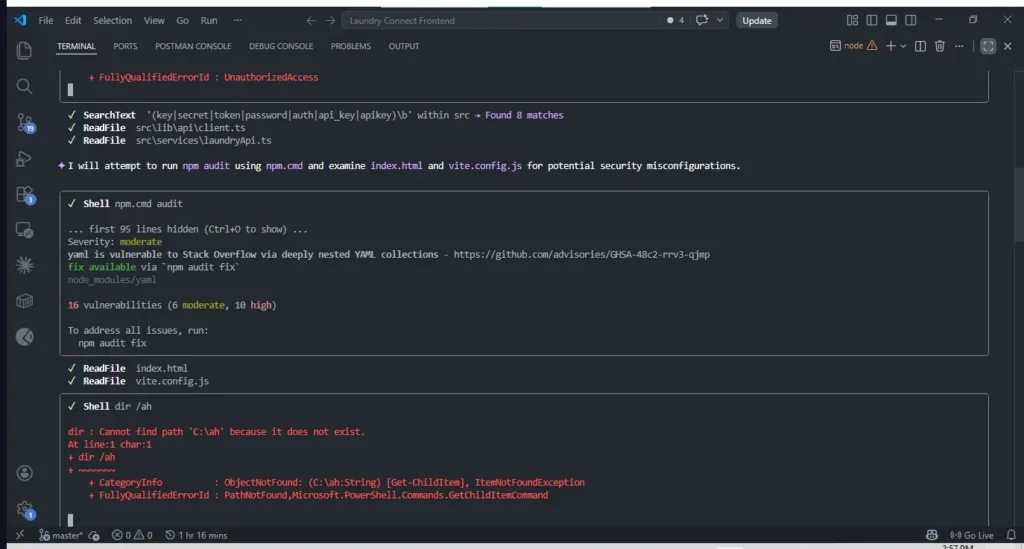
The final report covered five areas: dependency vulnerabilities, authentication bypasses, browser security headers, information leakage, and a suspicious nul file in the root directory (a Windows artefact from a misdirected shell command that could cause issues with security tooling).
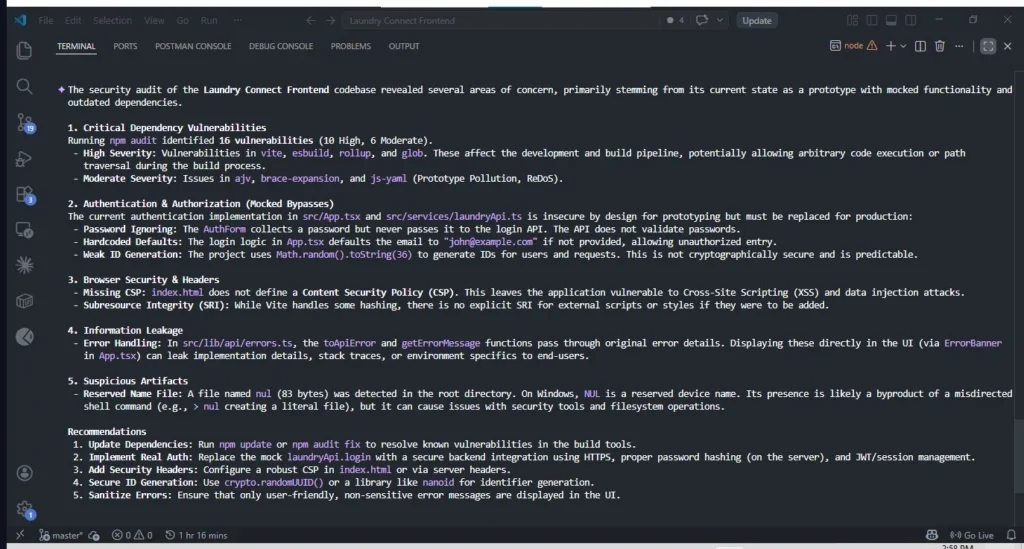
16 vulnerabilities found. 10 high, 6 moderate. Authentication mocked by design but flagged for production. CSP missing. Math.random() used for ID generation, which is not cryptographically secure.
That's a production readiness report generated from a single prompt across the entire codebase.
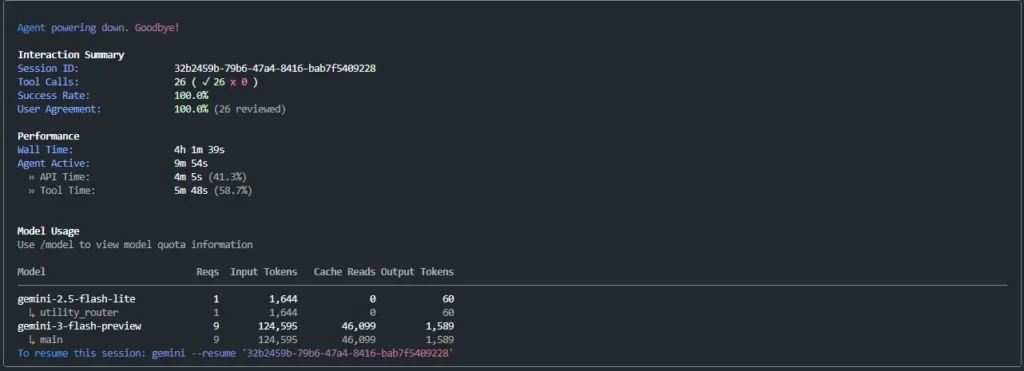
The session summary tells the story clearly. 124k tokens of context processed. 26 tool calls. 100% success rate. Active agent time: under 10 minutes.
That's what large context looks like when it's working.
What's the Difference, Really?
Both tools completed their tasks. The way they worked couldn't have been more different.
Claude Code read two files, formed a plan, stated it explicitly, then executed across three files in a coordinated sequence. Every decision was visible before it was made.
Gemini CLI scanned the entire project, hit a Windows error, recovered without prompting, and delivered a structured five-point report. It didn't plan out loud. It just moved.
That's not a quality difference. It's a behavioural difference.
- Claude Code defaults to structure: it shows its reasoning before acting
- Gemini CLI defaults to momentum: it processes broadly and adapts mid-execution
Neither approach is better. They reflect what each tool is optimised for.
Running Claude Code and Gemini CLI as One Workflow
Most people who use both tools still use them separately. They finish with one and switch to the other. That's not a workflow. That's just alternating.
The shift happens when you stop choosing between them and start assigning them.
Here's what that looks like in practice.
The task: introduce a consistent data layer across the LaundryConnect frontend so every API response follows a unified { data, error, meta } structure.
The first thing I did wasn't open a terminal. It was add a CLAUDE.md file to the root of the project. A short coordination file that tells Claude Code when to think, when to delegate, and what commands to hand off to Gemini CLI.
Pro tip: Scope the Gemini commands to the directories that matter in your project. Scanning everything works on machines with enough RAM, but targeting @src/ keeps it fast on smaller setups. (If you're hitting memory limits on your local machine, a VPS with 32GB+ RAM handles full-codebase scans without breaking a sweat.)
Here's the CLAUDE.md I used:
# Project AI Workflow

## Tool Roles
- **Claude Code** → planning, reasoning, architecture, validation
- **Gemini CLI** → codebase-wide scanning, bulk analysis, cross-file execution

## When to Delegate to Gemini CLI
Always delegate to Gemini CLI when:
- Scanning any directory for patterns or inconsistencies
- Auditing code across multiple files
- Bulk refactoring across more than 3 files
- Any task that involves reading more than one file at a time

## Gemini CLI Commands

### Full project overview
gemini -p "@./ Give me an overview of this entire project"

### Scan specific directories
gemini -p "@src/ [your task here]" > output.md 2>&1 &

### Full codebase scan
gemini --allfiles -p "[your task here]" > output.md 2>&1 &

> Always redirect output with `> filename.md 2>&1 &` for any substantial analysis.

## Workflow Pattern
1. **Plan** with Claude Code: define structure, flag edge cases
2. **Execute** with Gemini CLI: scan to find all instances, then refactor at scale
3. **Validate** with Claude Code: confirm consistency before committing
To verify it was picked up, I asked Claude Code directly: "What workflow rules are you following for this project?"
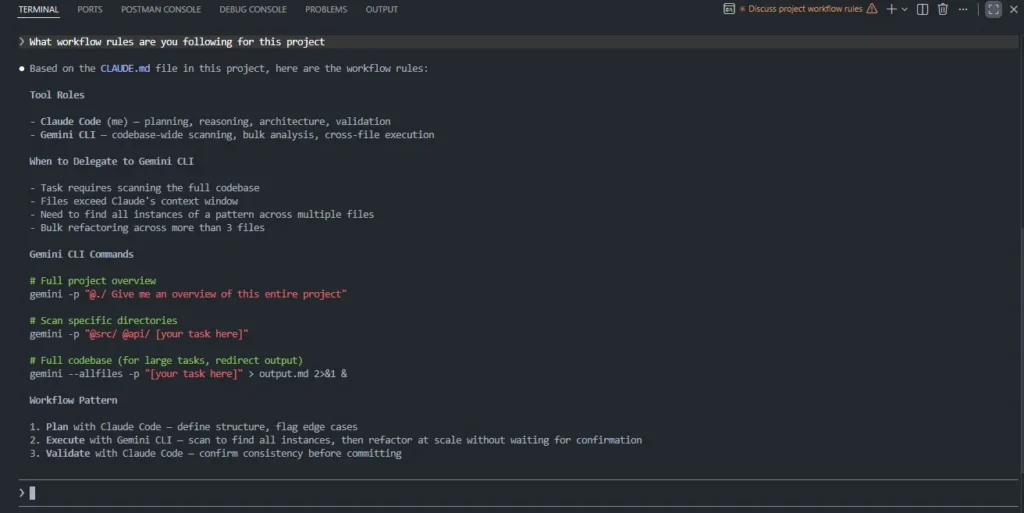
It read back everything. The tool roles, the delegation triggers, the Gemini commands, and the three-step workflow pattern. The file was live.
Notice how it describes itself: "Claude Code (me): planning, reasoning, architecture, validation." It's not just storing the instructions. It's operating from them.
With that in place, I typed one prompt:
"Audit the services layer for API response consistency and flag anything that doesn't follow a
{ data, error, meta }structure."
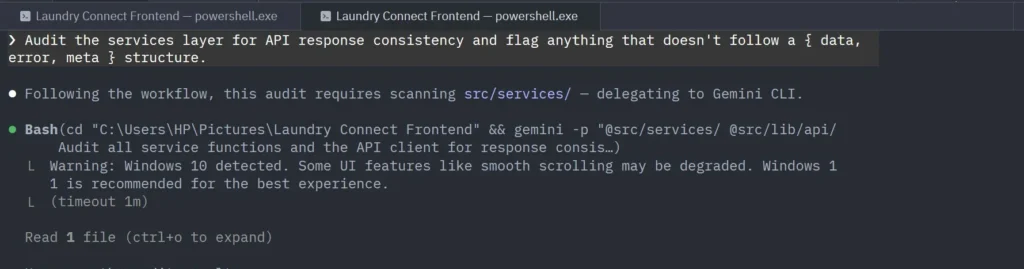
Claude Code read the CLAUDE.md, recognised this as a scan task, and delegated to Gemini CLI immediately. No second prompt. No manual switching.
Gemini CLI scanned the services layer and came back with a full audit.
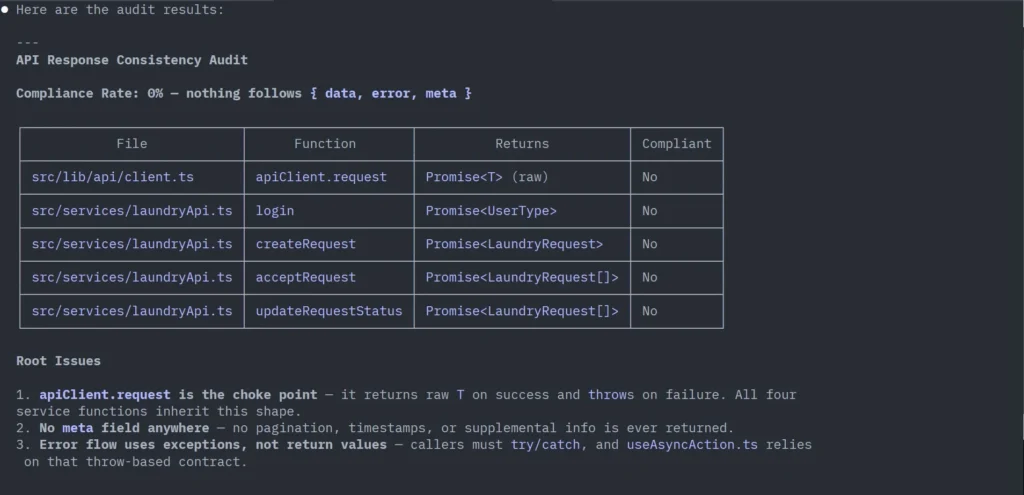
Compliance rate: 0%. Every service function was returning raw data. No envelope, no error field, no meta. But more importantly, it traced the problem to its source.
_"The entire fix lives in one place:
src/lib/api/client.ts:11."
One file. One function. Wrapping the return there would make all four service functions compliant automatically.
That's the large context advantage in practice. Not just finding problems, but tracing them back to their origin across the entire codebase in a single pass.
Claude Code then came back and asked: "Want me to implement the fix?"
That pause is the handoff. Gemini CLI finished the execution layer. Claude Code is back at the system layer, ready to act. I typed: "Implement the fix."
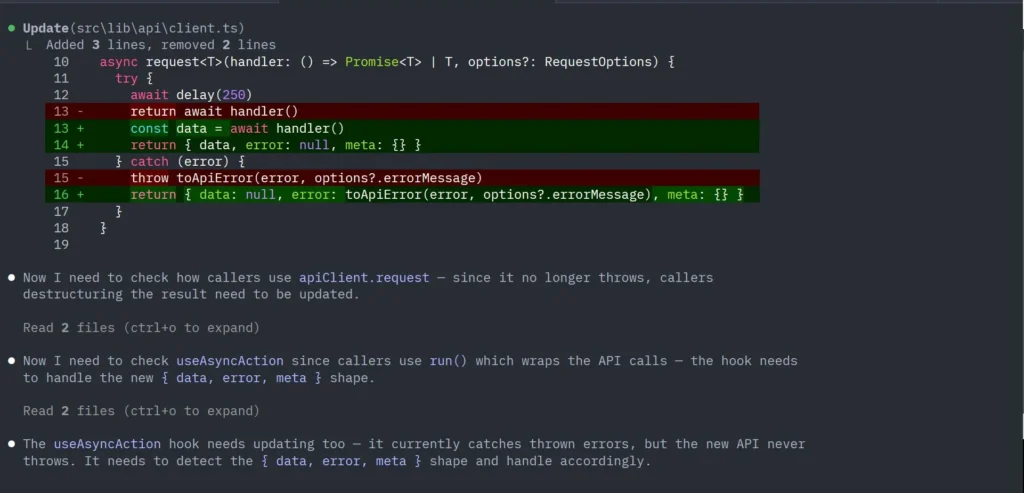
What followed wasn't a one-line change. Claude Code updated client.ts to return the { data, error, meta } envelope, then read the callers, found that useAsyncAction.ts relied on the old throw-based contract, updated that hook to unwrap the new shape, caught a subtle stale state bug in its own first attempt, and corrected it before finishing.
No changes needed in App.tsx or laundryApi.ts. The callers stayed untouched.
The workflow in full:
Prompt → Claude Code plans → delegates to Gemini CLI → Gemini audits
       → Claude Code implements → validates → done
This is what running both tools actually looks like. Not switching. Not comparing. One terminal deciding, the other executing. Coordinated through a 33-line config file.
What this reveals about both tools:
- Claude Code reduces complexity through reasoning and structure
- Gemini CLI reduces complexity through context and speed
That's why they don't replace each other. They operate at different layers.
- Claude Code → system layer: thinking, planning, validation
- Gemini CLI → execution layer: scanning, finding, refactoring at scale
The question was never "which tool is better?" It was always "which tool should own this part of the work?"
Once you start thinking that way, you stop burning time on the comparison and start getting the leverage both tools were built to give you.
Developer Experience: Feedback Loops and Daily Use
Beyond the workflow itself, the two tools create noticeably different experiences over time.
Feedback Loops and Decision Timing
The clearest way to see this difference is in how each tool structures its feedback loop.
Gemini CLI operates on a continuous loop. Outputs produced and refined in real time. Decisions happen during execution, not before it. That keeps momentum high but can introduce variability on complex tasks.
Claude Code follows a more layered loop. It separates understanding, planning, and execution into distinct steps. That separation slows things down but makes the process more predictable. Decisions are made before execution begins, which reduces the likelihood of errors spreading across the system.
Over time, this shifts how you approach problems. Gemini CLI pulls you toward reactive iteration. Claude Code pushes you toward deliberate decision-making.
Context Window Parity and Why It Still Doesn't Tell the Full Story
By early 2026, both tools support 1M token context windows. The gap that once defined Gemini CLI's advantage has closed on paper.
But having the same context window doesn't produce the same results. Gemini CLI loads broadly and acts quickly, which is useful when you need to scan fast. Claude Code loads deliberately and reasons through what it finds, which is useful when you need the output to hold together across a complex system.
More context doesn't automatically mean better decisions. What you do with it does.
What the Community Is Noticing About Claude Code vs Gemini CLI
This isn't just a conclusion I arrived at alone. The same pattern is emerging across real-world workflows.
On Reddit, one thread stood out, titled _"Gemini CLI is impressive, but Claude Code is acting like the real senior engineer"_. One comment captured what kept coming up across the discussion:
"Gemini CLI finally feels like an AI that belongs in the terminal… but Claude quietly outperforms it in reasoning-heavy tasks: cleaner refactors, sharper edge-case spotting, and better repo-level understanding."
That same pattern (Claude thinks, Gemini executes) showed up independently from developers who reached the same conclusion through their own workflows.
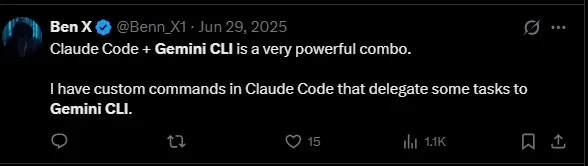
Ben took it further in a follow-up:
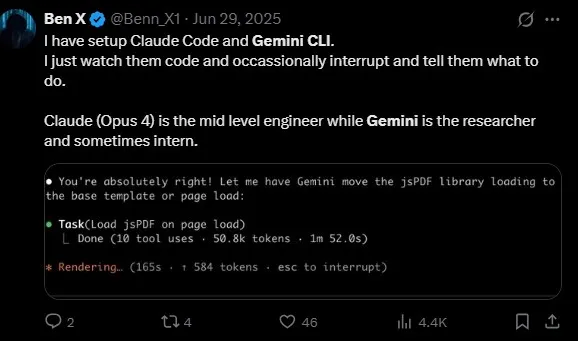
That framing maps cleanly to what the workflow actually produces. Claude Code owns the reasoning. Gemini CLI handles the legwork. The roles aren't equal, and that's the point.
The original insight that pushed me toward the CLAUDE.md setup came from this:
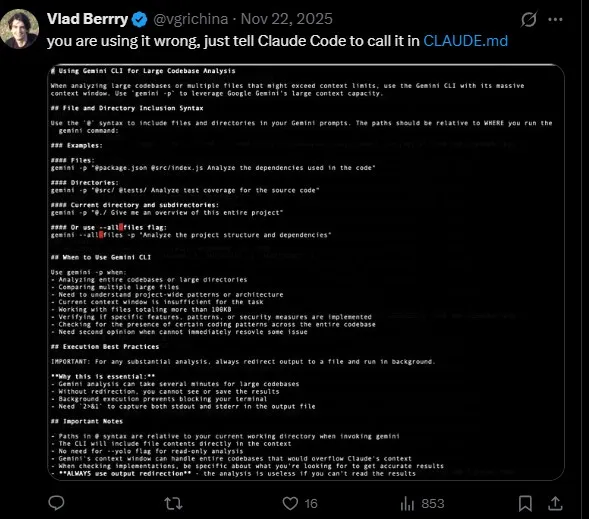
Not everyone is convinced, though:

312 likes. That's not a fringe opinion.
It's worth taking seriously. Gemini CLI is inconsistent on Windows, memory-heavy on large codebases, and can feel unreliable when tasks require deeper reasoning. The workflow in this article works, but it required scoping, a coordination file, and understanding where Gemini CLI breaks down.
The combo isn't plug-and-play. It's plug-and-configure. But when it's set up correctly, the results speak for themselves.
Tired of agentic sessions eating your laptop's RAM? Run Claude Code and Gemini CLI on a persistent VPS instead. Our 96GB RAM Performance plan handles full-codebase scans without breaking a sweat. Or grab our flagship Business VPS with 72GB RAM and priority support for $99/month.
Claude Code vs Gemini CLI Pricing
Claude Code Pricing
Claude Code is bundled within Claude subscription tiers rather than sold as a standalone product. Pricing is structured around usage tiers, making it relatively predictable compared to usage-based systems.
- Pro (Individual) — $20/month: Entry-level access with moderate usage limits. Suitable for light development work, experimentation, and smaller projects.
- Max 5× — $100/user/month: Roughly five times the Pro usage. Better suited for consistent development workflows, mid-sized repositories, and more frequent agent interactions.
- Max 20× — $200/user/month: Designed for heavy daily usage, large refactors, and long-context tasks. Closer to a full-time development companion.
- Team — ~$150/user/month (minimum seats required): Adds collaboration features, shared access, and team-level controls.
- Enterprise — Custom pricing: Advanced security, compliance, and organisation-wide governance.
Claude Code follows a subscription-first model. You pay for capacity and predictability, not per-task execution. For a full breakdown, see our guide to Claude Code pricing across every plan.
Gemini CLI Pricing
Gemini CLI takes the opposite approach. It starts free and scales with usage, which makes it accessible but less predictable at higher volumes.
- Free tier — 1,000 requests/day: Available with a personal Google account, no credit card required. Limited to Flash models. Enough for exploration, light scripting, and getting familiar with the tool.
- Google AI Pro — ~$20/month: Unlocks Gemini Pro models with higher usage limits. Comparable entry point to Claude Pro in cost, but with meaningfully more daily capacity.
- Google AI Ultra — ~$250/month: Built for power users running intensive, large-context operations across entire codebases.
- API (pay-as-you-go): ~$2 per 1M input tokens (Gemini 3.1 Pro), ~$12 per 1M output tokens. Keeps small tasks cheap but can scale quickly when running repeated large-context scans.
- Google Workspace / Vertex AI — Enterprise pricing: For teams already inside the Google Cloud ecosystem.
Gemini CLI follows a usage-first model. The free tier lowers the barrier to entry, but costs can grow faster than expected if you're running large scans frequently.
Which Is Easier to Budget?
Claude Code is easier to predict. You pick a tier and stay within it.
Gemini CLI offers more flexibility and a genuinely free starting point, but requires more awareness of how usage compounds over time, especially on codebase-wide operations.
What Ended Up Working Best
The biggest shift wasn't choosing between Claude Code and Gemini CLI. It was reframing them. Not as competing tools, but as different layers of the same workflow.
Claude Code became the system layer. Where I go to understand the codebase, think through decisions, and plan changes before anything runs. It slows things down, but in a way that brings clarity and reduces mistakes.
Gemini CLI became the execution layer. Where ideas turn into code quickly. Iteration is fast, feedback is immediate, and small tasks don't get blocked by process.
That combination changes the question entirely. Instead of asking which tool is better, you start asking which tool fits this moment.
Once that shift happens, both tools stop feeling like alternatives and start feeling like leverage.
Run Claude Code and Gemini CLI on a Reliable VPS
Both tools benefit from a persistent, always-on environment. Long agentic sessions, full-codebase scans, and orchestrated workflows like the one above eat memory and need stable infrastructure that doesn't sleep when your laptop does.
That's exactly what SSD Nodes is built for:
- Claude Code installation guide for Ubuntu — get up and running in under 10 minutes
- Pricing plans starting at $5.50/month — including a new 96GB RAM tier for heavy workloads
- Business VPS at $99/month — 72GB RAM, daily snapshots, priority support, all included
- VPS API for automation — control your entire fleet programmatically from your scripts
- Install and Use Gemini CLI on Ubuntu Linux
Set up once. Iterate forever.
Ready to give your AI coding workflow a real home? Check out our VPS plans or grab our flagship Business VPS for production-ready infrastructure with everything included.